Sep 22, 2021

kubernetes high level overview

Kubernetes is an open-source system for automating deployment, scaling, healing, networking, persistent storage options, and management of containerized applications. It provides features like Service Discovery, Load Balancing, Storage Orchestration, Automates Rollout/Rollback, Self-healing, Secret and Configuration Management, Horizontal Scaling, Zero downtime deployment, blue-green, canary, Run like the production on the development machine. 

It consists of one or more master nodes that will manage one or more worker nodes that together work as a cluster. The master node will start something call pod on the worker node, which is a way to host container. You will need a Deployment/replica set to deploy the pod. Kubernetes does not deploy the container on a worker node, but it encapsulates it within a kubernetes object called pods. One pod will contain only one same type application container, but you can have different type application containers running in the same pod, like the front end and middle-tier container running in the same pod. In this case, the two containers can talk using localhost since they share the network space and also they share storage space.

Master Node Components (collectively known as the control plane)

API Server - This acts as a front-end to the Kubernetes, users, management devices, command-line interface which talks to the API Server to interact with  Kubernetes.

ETCD store - It's a  key-value pair database that stores information about the cluster

Scheduler -  Responsible for distributing work or containers across nodes. It looks for a newly created container and assigns it to the node. node/pod running comes to life or goes away.

Controller - They are responsible for processing and responding when Node/container goes down, it makes a decision to bring up a new container. They are the brain behind the orchestration.

Worker node components (collectively known as the data plane)

Container Runtime - Underlying software which is used to run container.. like docker, rocket, etc

Kubelet - It's an agent which runs on each node in the cluster, agent is responsible for making sure that the container is running as expected. It runs on the node which registers that node with the cluster to report back and forth with the master node.


Kubectl Explain

Kubectl Explain is a handy command to List the fields for supported resources and also get detailed documentation around that. Its a good way to explore any kind of k8s object. Refer following for few example. Also refer kubectl-commands and cheatsheet 

kubectl explain deployment.spec.strategy.rollingUpdate

kubectl explain deployment.spec.minReadySeconds

kubectl explain pod.spec.tolerations

kubectl explain pod.spec.serviceAccountName

kubectl explain pod.spec.securityContext

kubectl explain pod.spec.nodeSelector

kubectl explain pod.spec.nodeName

kubectl explain pod.spec.affinity

kubectl explain pod.spec.activeDeadlineSeconds

kubectl explain job.spec.

kubectl explain job.spec.ttlSecondsAfterFinished

kubectl explain job.spec.parallelism

kubectl explain job.spec.completions

kubectl explain job.spec.backoffLimit

kubectl explain job.spec.activeDeadlineSeconds


If you want to get more familiar with the imperative way of creating k8s resources refer CKAD Exercises as they can be useful during the CKAD exam. The imperative way of creating resources sometimes saves time which is critical in the exam. You can always patch or edit the resource if that's allowed. 


Apr 12, 2021

Snowflake Introduction

Snowflake is a Fully Managed cloud data platform. This means that it provides everything you need to build your data solution, such as a full-feature data warehouse. It is cloud-agnostic and most importantly you can even replicate between the clouds. 

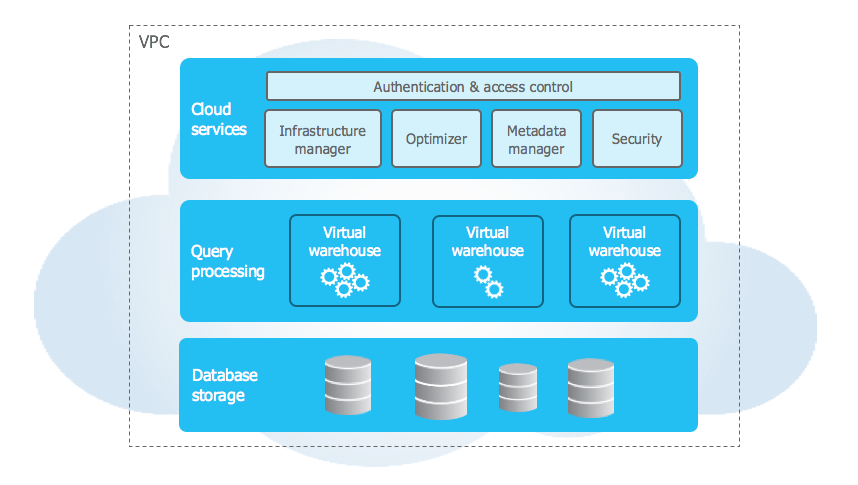
The architecture comprises a hybrid of traditional shared-disk and shared-nothing architectures to offer the best of both. 

The storage layer organizes the data into multiple micro partitions that are internally optimized and compressed. Data is stored in the cloud storage (storage is elastic) and works as a shared-disk model thereby providing simplicity in data management. The data objects stored by Snowflake are not directly visible nor accessible by customers; they are only accessible through SQL query operations run using Snowflake. As the storage layer is independent, we only pay for the average monthly storage used.

Compute nodes (Virtual Warehouse) connect with the storage layer to fetch the data for query processing. These are Massively Parallel Processing (MPP) compute clusters consisting of multiple nodes with CPU and Memory provisioned on the cloud by Snowflake. These can be started, stopped, or scaled at any time and can be set to auto-suspend or auto-resume for cost-saving. 

Cloud Services Layer handles activities like authentication, security, metadata management of the loaded data, and query optimization

Data is automatically divided into micro-partitions and each micro-partition contains between 50 MB and 500 MB of uncompressed data. These are not required to be defined upfront. Snowflake stores metadata about all rows stored in a micro-partition.Columns are stored independently within micro-partitions, often referred to as columnar storage. Refer this for more details. 

In addition to this, you can manually sort rows on key table columns, however, performing these tasks could be cumbersome and expensive. This is mostly useful for very large table

May 6, 2020

SNS

SNS is the notification service provided by AWS, which manages the delivery of a message to any number of subscribers. It uses the publisher/subscriber model for push delivery of messages. Subscribers are notified using following supported protocols - SQS, lambda, http/s, email, SMS. 

To use SNS, you create a topic and define a policy that dictates who can publish and subscribe to it. You can define policy by configuring the condition to give cross-account access. An SNS request has a Topic where you want to publish to, Subject, Message, MessageAttributes, MessageStructure. 

The subscriber can define subscription filter policy and dead-letter queues. By configuring the subscription filter policy, you can filter the message to be sent to the subscriber based on rules defined on the message attribute. You can assign a redrive policy to Amazon SNS subscriptions by specifying the Amazon SQS queue that captures messages that can't be delivered to subscribers successfully. You can test this by deleting the endpoint like lambda function. 

When you configure dead letter Q, you need to make sure, that SNS has the necessary permission to publish the message to the Q, by adding permission policy in SQS with SNS earn. Once a message is in dead letter Q, you can either have lambda configured to process them and also use cloud watch metrics to monitor dead letter Q.

SNS -> Lambda vs SNS -> SQS -> Lambda

If you have SQS in between SNS and Lambda, it can give you the flexibility of reprocessing. You may be able to set Redrive policy for SQS and set Maximum Receives, which essentially means the message will be received by lambda that many numbers of times before being sent to the dead letter Q. If no Redrive policy is set, then after every visibility timeout, the message will be sent to the lambda, until the message retention period. In case when SNS directly sends the message to lambda, its only one time, and if it fails it will get sent to the dead letter Q if Redrive policy is set. With SQS you can have a retention period of at least up to 14 days.

SQS retry happens after the visibility timeout occurs and the visibility timeout should be more than lambda timeout which essentially makes sure the message is sent to lambda only after lambda processing is completely done, which prevents duplicate processing of the message.

In Sqs (Pull Mechanism) messages are persisted for some (configurable) duration if no consumer is available, whereas in Sns (Push Mechanism) messages are sent to the subscribers which are there at the time when the message arrives.


Apr 14, 2020

React Introduction

React helps you build encapsulated components that manage their state, then compose them to make complex UI. The component has Props & State which represents its model. The data flow one way down the component hierarchy. 

state => view => action => state => view

View


The view is the direct result of rendering DOM using ReactDOM.render from the react-dom package. For a given model the DOM will always be the same, so the only way to change DOM is to change the model. Once a model is rendered in DOM, it can generate events that feedback into the state and trigger another render cycle. Once a state is changed react will render DOM. A state is always owned by one Component. Any data that’s affected by this state can only affect Components and its children. Changing state on a Component will never affect its parent, or its siblings, or any other Component in the application.

For efficient rendering, React maintain its document obstruction. A component render function updates this fake document object model known as the virtual DOM which is extremely fast. Once that happens react compares the fake document object model to the real document object model and update the real document object model in the most efficient way possible. Updating DOM is an expensive operation as redrawing large sections of DOM is inefficient. The comparison of virtual DOM with a real document happens in memory. 

ReactDOM takes two arguments: the first argument is JSX expression and the 2nd argument is dom element, this is the place where the react component will be inserted into the DOM element.

JSX


It's an XML like syntax extension to javascript which is used to describe how UI will look like. You can put any valid JavaScript expression inside the curly braces in JSX. Since the browser doesn't understand JSX, so it must be compiled to javascript, which is handled by bable. You may have an option to write directly the javascript and not JSX, but that may not be easier to write/read/maintain. If you are interested you can use https://babeljs.io/ to see how JSX is compiled to javascript. Writing HTML in javascript looked a little weird if you come from the angular background, but if you really think even in angular you write javascript in angular HTML like ngFor, etc. So either way, you have one of the two options - write js in HTML or HTML in js. One advantage I see with HTML in js is that at compile time you can catch an error. There are few minor differences between JSX and HTML like className for class and htmlFor for for. JSX can represent two types of element

  • DOM tag like div, dom tags are written in lower case, attributes passed to these elements are set on rendered DOM
  • User definer element must be starting with a capital letter. attributes to user-defined elements are passed to the component as a single object, usually referred to as props. All react components must act like pure functions with respect to their props, for a given prop output should be same and component needs to be rendered only if prop changes

Props and State


Props is short for properties. It allows you to pass data to the child component. Props are immutable as they are passed down from parent to child, so they are owned by the parent, so you cannot change it. On the other hand, the state is used to hold data that your component need to change for example value of the text field. To update state you use setState

Event


React events (called synthetic event) are very similar to dom events, with few minor differences like name with camel case compare to lower case and function being passed as event handler rather than string. To prevent default you need to call preventDefault on the event object. SyntheticEvent are cross-browser wrapper around the browser’s native event. You can access browser native event by accessing nativeEvent. Since data flow one way, the only way to pass data is to raise event and update state which will eventually trigger view update. The same way you can pass data to the parent component, by calling function passed in the props.

Angular vs React

Both are component-based platform-agnostic rendering frameworks/tools, which you can write using typescript or javascript.

Data Binding
Angular uses two-way data binding which helps write less boilerplate code to have a model and view in sync. React supports one-way data binding which makes debugging easier and maybe help in performance

Architecture
Angular is a full-blown framework that includes DI, forms, routing, navigation, HTTP implementation, directives, modules, decorators, services, pipes, templates with few advanced features like change detection, Ahead-of-Time compilation, lazy loading,  and Rx.js. This is built into core of the framework. React is much simple and you will have to use other libraries like redux, react-router, etc to make a complex application. React has a wider range of material design component libraries available.

CLI
Angular cli is a powerful command-line interface that assists in creating apps, adding files, testing, debugging, and deployment. Create React App is a CLI utility for React to quickly set up new projects


Mar 11, 2020

Running .NET Core 3.1 on AWS Lambda

AWS Lambda supports multiple languages through the use of runtimes. To use languages that are not natively supported, you can implement custom runtime, which is a program that invokes the lambda function's handler method. The runtime should be included in the deployment package in the form of an executable file named bootstrap. Here is the list of things which you need to do in order to run a .NET Core 3.1 on AWS lambda.

bootstrap

Since this is not a supported runtime, you need to include a bootstrap file which is a shell script that Lambda host calls to start the custom runtime.
#!/bin/sh
/var/task/YourApplicationName

Changes to project file

You need a couple of NuGet packages from Amazon.LambdaAspNetCoreServer and RuntimeSupport. AspNetCoreServer provides the functionality to convert API Gateway’s request and responses to ASP.NET Core’s request and responses and RuntimeSupport provides support for using custom .NET Core Lambda runtimes in Lambda

<PackageReference Include="Amazon.Lambda.AspNetCoreServer" Version="4.1.0" />
<PackageReference Include="Amazon.Lambda.RuntimeSupport" Version="1.1.0" /> 

Apart from that, you need to make sure to include bootstrap in the package and change the project output type to exe.

<OutputType>Exe</OutputType>

<ItemGroup>
    <Content Include="bootstrap">
      <CopyToOutputDirectory>Always</CopyToOutputDirectory>
    </Content>
</ItemGroup> 

Add Lambda entry point

This class extends from APIGatewayProxyFunction which contains the method FunctionHandlerAsync which is the actual Lambda function entry point. In this class override the init method where you need to configure startup class using the UseStartup<>() method. If you have any special requirements, you can use FunctionHandlerAsync, where you can write your own handler. One example will be lambda warmer, where you don't want the actual code to be executed, rather you would want to respond directly from this method. The following code snippet is just for reference purpose, with provisioned concurrency supported in AWS lambda, you can achieve the same


public override async Task<APIGatewayProxyResponse> FunctionHandlerAsync(APIGatewayProxyRequest request, ILambdaContext lambdaContext)
        {
            if (request.Resource == "WarmingLambda")
            {
                if (string.IsNullOrEmpty(containerId)) containerId = lambdaContext.AwsRequestId;
                Console.WriteLine($"containerId - {containerId}");

                var concurrencyCount = 1;
                int.TryParse(request.Body, out concurrencyCount);

                Console.WriteLine($"Warming instance { concurrencyCount}.");
                if (concurrencyCount > 1)
                {
                    var client = new AmazonLambdaClient();
                    await client.InvokeAsync(new Amazon.Lambda.Model.InvokeRequest
                    {
                        FunctionName = lambdaContext.FunctionName,
                        InvocationType = InvocationType.RequestResponse,
                        Payload = JsonConvert.SerializeObject(new APIGatewayProxyRequest
                        {
                            Resource = request.Resource,
                            Body = (concurrencyCount - 1).ToString()
                        })
                    });
                }
                
                return new APIGatewayProxyResponse { };
            }
        
            return await base.FunctionHandlerAsync(request, lambdaContext);

        }

Update Main function

In NET Core 2.1 which is native Lambda runtime, the LambdaEntryPoint is loaded by Lambda through reflection(through the handler configuration) but with custom runtime, this needs to be loaded by the main function. To make sure the ASP.NET Core project works locally using Kestrel, you can check if AWS_LAMBDA_FUNCTION_NAME environment variable exists.


if (string.IsNullOrEmpty(Environment.GetEnvironmentVariable("AWS_LAMBDA_FUNCTION_NAME")))
{
CreateHostBuilder(args).Build().Run();
}
else
{
var lambdaEntry = new LambdaEntryPoint();
var functionHandler = (Func<APIGatewayProxyRequest, ILambdaContext, Task<APIGatewayProxyResponse>>)(lambdaEntry.FunctionHandlerAsync);
using (var handlerWrapper = HandlerWrapper.GetHandlerWrapper(functionHandler, new JsonSerializer()))
using (var bootstrap = new LambdaBootstrap(handlerWrapper))
{
bootstrap.RunAsync().Wait();
}
}

Add defaults file

.NET Lambda command-line tools and VS deployment wizard use a file called aws-lambda-tools-defaults.json for settings to use for packaging Lambda project into a zip file ready for deployment and for deployment. Deployment under the hood uses cloud formation. Run following to explore more about tool
dotnet lambda help

Cli Command

dotnet lambda package --output-package lambda-build/deploy-package.zip
dotnet lambda help

Nov 23, 2019

AWS Lambda

AWS Lambda is a service that provides you the option to run function written in .net core, node, python, java, etc to run on aws. AWS Lambda executes code only when needed and scales automatically. You pay only for the compute time you consume and no code when your code is not running, which is different than code running in Ec2 instance or ECS container. 

When a function is invoked, AWS lambda creates an instance and runs its handler method. While the first event is being processed, if the function is invoked again, and no instance is available, AWS lambda will create another instance. After processing the event the instance sticks around to process additional events. When a new instance is created, the response time increases which is called cold start. As more events come in, Lambda routes them to available instances and creates new instances as needed. Your function's concurrency is the number of instances serving requests at a given time. When the number of requests decreases, Lambda stops unused instances to free upscaling capacity for other functions. There is a limit to concurrency limit based on the region. When requests come in faster than your function can scale, or when your function is at maximum concurrency, additional requests fail with a throttling error.

To ensure that a function can always reach a certain level of concurrency, as a maximum allowed concurrency is shared across all functions in an account, you can configure the function with reserved concurrency. When a function has reserved concurrency, no other function can use that concurrency. Reserved concurrency also limits the maximum concurrency for the function.

To enable your function to scale without fluctuations in latency, you can use provisioned concurrency. It also integrates with auto-scaling, so you can update provisioned concurrency based on the demand.  The overhead in starting lambda (cold start) consists of two parts - time to set up an execution environment that is entirely controlled by AWS, and code initialization which involves things like initializing objects and frameworks. Provisioned Concurrency targets both causes of cold-start latency

You configure the amount of memory which will be available during execution. Similarly, you configure timeout which is the maximum time a function can run.  All AWS Lambda functions run securely inside a default system-managed Virtual Private Cloud (VPC) however you can configure it to run within custom VPC, subnet (use at least two subnets for high availability), and Security Group. When you enable a VPC, your Lambda function loses default internet access. If you require external internet access for your function, make sure that your security group allows outbound connections and that your VPC has a NAT gateway.

Lambda function and trigger (like API gateway) are the core component of AWS lambda. You specify the execution role is the IAM role that AWS Lambda assumes when it executes your function.

Handy Cli Command
aws lambda help
aws lambda update-function-code --profile <profile-name-if-not-default> --function-name  <function-name> --zip-file fileb://lambda-build/deploy-package.zip

Nov 10, 2019

AWS ECS

ECS is AWS’s proprietary, managed container orchestration service that supports Docker, much like google open-sourced container orchestration platform Kubernetes. Amazon also supports Kubernetes with their EKS offering more on that later. Running applications in containers rather than traditional VM’s brings great value due to the fact that they are easily scalable and ephemeral. However operating at scale, a container orchestration platform that automates the provisioning and deployment, redundancy and availability, scaling up\down based on a given load, resource allocation, health monitoring of containers and hosts, seamless deployment of new application versions, has become necessary. There are two ways to launch containers for both ECS and EKS and a factor to choose between them depends on how much control you want to have at the cluster host.

EC2 - You are responsible for deploying and managing your own cluster of EC2 instances for running the containers. Here the billing is based on the cost of the underlying EC2 instances and it's your responsibility to make sure your containers are densely packed and also your instance has all updates. This is more suitable for a large workload which requires more CPU and memory (or any special requirement) where you can optimize pricing by taking advantage of using spot instance or reserved instance.
AWS Fargate - You run your containers directly, without any EC2 instances. Here the billing is based CPU cores, and memory your task requires, per second. This is more suitable for small workloads with occasional bursts and also for the case where you do not want to manage the overhead of underlaying host.

ECS Cluster

Its a logical grouping of task or service. There are two ways to create a cluster: Network only and Ec2 with Networking. In the case of Ec2 launch type its a group of the container instances. You can assume this as a group of container instances (in case of Ec2 launch type you manage and create those instances, in case of Fargate, Amazon does that for you) acting as a single resource. You can mix and match instance types within a cluster but instances cannot join multiple clusters. A task is scheduled onto clusters. Handy aws cli command around ecs cluster
aws ecs create-cluster --cluster-name mycluster
aws ecs list-clusters
aws ecs describe-clusters --cluster mycluster
aws ecs delete-cluster --cluster mycluster

Container Agent

It allows container instances to join a cluster and it runs on Ec2

Container Instances

Ec2 instance registers to a cluster and connects via a container agent. The state can be active and connected, active and disconnect (in case if the instance is stopped) and finally inactive (terminated instance)

Task Definition

This describes how the docker image should run. This can include one or more containers. Grouped containers run in the same instance. This will help the interaction between containers in terms of latency. There are three main components of task definition

Family

Following are few of the important configuration which belongs to this
  • Task Execution Role - This role is required by tasks to pull container images and publish container logs to Amazon CloudWatch on your behalf. 
  • Task Role - IAM role that tasks can use to make API requests to authorized AWS services. For example, you can have a role configured to access S3 bucket and the task running can access s3 bucket.
  • Network Mode - awsvpc, bridge, host, none

Container Definition 

This includes the following 
  • image 
  • port mapping - You cannot run two container instances on the same ec2 instance which uses the  same port. Container ports and protocols combination must be unique within a Task definition
  • environment variables and entry point, 
  • CPU - CPU unit reserved for the container, maps to CpuShares in docker run
  • Memory - Amount of memory for a container, the sum of all container memory within a task should be less than task memory. The container will die if it exceeds the memory limit. This maps to memory docker run
  • Memory reservation - When system memory is under heavy contention, Docker attempts to keep the container memory to this soft limit. Hard limit is the maximum it can use after which container will die. This maps to MemoryReservation in docker run.
  • Logging configuration - You can configure your container instances to send log information to cloud watch or splunk etc 

Volumes

This is used for persisting data generated by and used by Docker containers.

You can define multiple containers in a task definition, though you should be careful in creating task definitions that group the containers that are used for a common purpose, and separate the different components into multiple task definition

Task Networking in AWS Fargate Task Definition

awsvpc network mode gives Amazon ECS tasks ENI, private IP and also provides greater security for your containers by allowing you to use security groups and network monitoring tools ( like VPC Flow Logs ) at a more granular level within your tasks. Containers belonging to the same task can communicate over the localhost interface.  When running a task in Fargate, there are two different forms of networking to consider:

Container (local) networking - Container networking is often used for tightly coupled application components, so it bypasses the network interface hardware and instead of the operating system just routes network calls from one process to the other directly and hence results in faster communication. Fargate uses a special container networking mode called awsvpc, which gives all the containers in a task a shared elastic network interface to use for communication. If you specify a port mapping for each container in the task, then the containers can communicate with each other on that port like 127.0.0.1:8080. However, when you deploy one or more containers as part of the same task they are always deployed together so it removes the ability to independently scale different types of workload up and down.

External networking - External networking is used for network communications that go outside the task to other servers that are not part of the task, or network communications that originate from other hosts on the internet and are directed to the task.

Scheduler

Scheduler helps you utilize your cluster resources. You don't have to figure out which Ec2 instance in the cluster will be running the task unless you have a specific need. There are three ways to schedule something on your cluster
  • Services - These are long-lived and stateless. You define how many task instance will be running. It plays nicely with LB which load balances traffic to multiple task instances. Three steps of running task into a cluster
    • Based on task definition it will figure out which container instances are available to run the task
    • Figure out which AZ has the least amount of service task running
    • Figure out which instance has the least amount of task running
  • Task - These are sort lived/1 off the task that exit when done. You can use run task command which distributes tasks on your cluster and minimizes specific instances from getting overloaded.
  • Starting Task - StartTask will let you pick where you want to run the task. It will let you build or use your own scheduler.
Both service and task have three states - pending, running, stopped. The container agent is responsible for state tracking.

AWS ECS Autoscaling

AWS Auto Scaling automates capacity management for various AWS services. For ECS you specify the minimum/maximum number of the task which sets the boundary of the autoscaling policy. You also need to specify the IAM role that authorizes ECS to use autoscaling service. You can create an IAM role for service application-autoscaling.amazonaws.com and attach policy AmazonEC2ContainerServiceAutoscaleRole to it.

Autoscaling Policy

You can define target tracking or step-scaling policy. For target tracking, you can specify a target value for Average CPU Utilization, Average Memory Utilization, or Request Count, based on which, your service will scale out or scale in. For step-scaling, you can use cloud watch alarm, with a threshold, based on which you can add or remove the task. Cloud watch alarm for ECS fragate, supports CPU Utilization and Memory Utilization ECS service matrix. It also supports the cooldown period, which is the duration for which the next scaling operation is hold off.


Handly aws cli command around ecs service/tasks
aws ecs create-service --generate-cli-skeleton
aws ecs create-service --cluster mycluster --service-name web --task-definition web --desired-count 1
aws ecs list-services --cluster mycluster
aws ecs describe-services --cluster mycluster --services web
aws ecs update-service --cluster mycluster --service-name web --task-definition web --desired-count 2
aws ecs delete-service --cluster mycluster --service-name web 
aws ecs register-task-definition --generate-cli-skeleton
aws ecs run-task --cluster mycluster --task-definition web --count 1
aws ecs list-tasks --cluster mycluster
aws ecs stop-task --cluster mycluster --task arn
aws ecs list-container-instances --cluster mycluster
aws ecs start-task --cluster mycluster --task-definition web --container-instances arn